

Are two-column resumes ATS-friendly? Mostly readable, but the order is where they fail. We ran 21 of our own resume templates through text extraction. Not one produced overlapping text. The two with a left sidebar still read in a different order from the single-column ones, and that order is the real risk.
I built a free resume builder with ATS-safe single-column templates, and this is the study behind how we label them. It includes the parts that went wrong, because a test that only reports passes is an advert.
What we tested, and what it can and cannot tell you
We took all 21 templates in our builder: the 17 you can pick today and 4 we have retired. Each was rendered 20 times. That is two paper sizes (Letter and A4), two page margins (3 mm and 10 mm) and five content lengths, so the page break lands in a different place each time. That is 420 renders in total, all with the same sample resume for a made-up person, “Ananya Iyer”, never anyone’s real data.
Each render was read back with pdf.js, Mozilla’s PDF library, and checked three ways:
- Overlaps: two pieces of text sitting on top of each other.
- Margin intrusions: text inside the page margin.
- Name first: whether the first thing extracted on page 1 is the candidate’s name.
We also ran three probes: heading letter spacing, a rotated name, and the width of a space in 12 fonts. The run is dated 12 October 2026.
| Group | Templates | Renders each | Overlaps | Margin intrusions | Name first |
|---|---|---|---|---|---|
| Live, single-column | 14 | 20 | 0 | 0 | 14 of 14 |
| Live, two-column | 3 (Vertex, Slate, Harbor) | 20 | 0 | 0 | 3 of 3 |
| Retired | 4 (Beacon, Marquee, Quill, Meridian) | 20 | 0 | 0 | 3 of 4 |
The overlap and margin checks never fired, in 420 renders. They are a safety net, not a discovery. The name-first check is weak too: it only looks at the first item, and, as the next section shows, all three two-column templates pass it, including the two whose sidebar comes out first below the name. The study did not check whether any text was lost, only order, overlaps and margins.
The limits matter as much as the results:
- pdf.js extraction approximates a parser. It is not any vendor’s ATS. Real systems differ, and some sort text by position instead of reading the file in order.
- It is one made-up resume, on our templates only.
- We did not test Word files, tables, text boxes or a Canva export. For Canva, see is a Canva resume ATS-friendly.
Two columns: the reading-order problem
The three live two-column templates are Vertex (a clean right sidebar), Slate (a dark left sidebar) and Harbor (a tinted left sidebar).
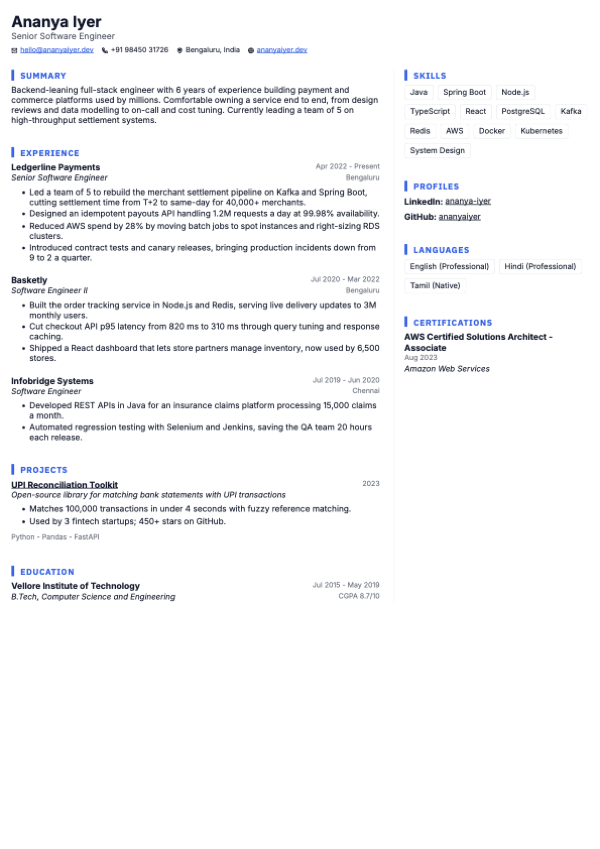
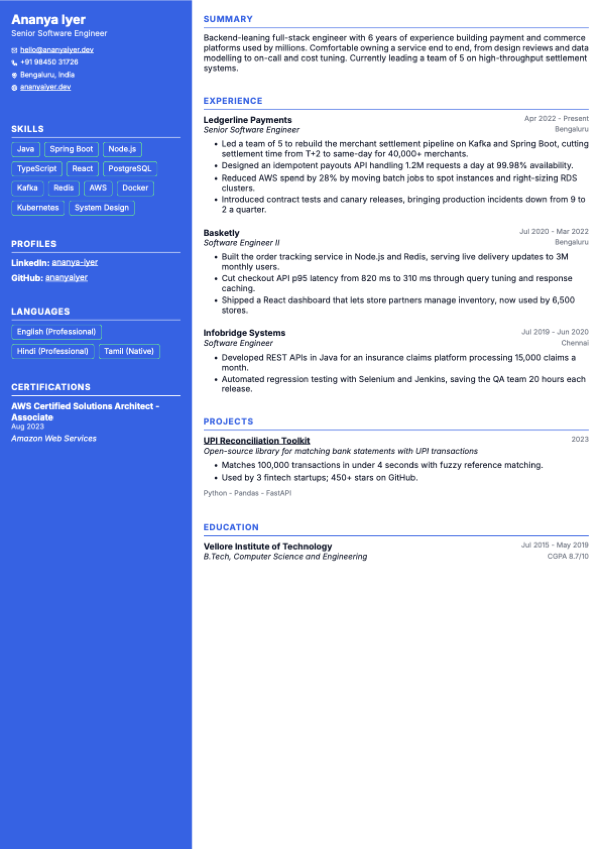
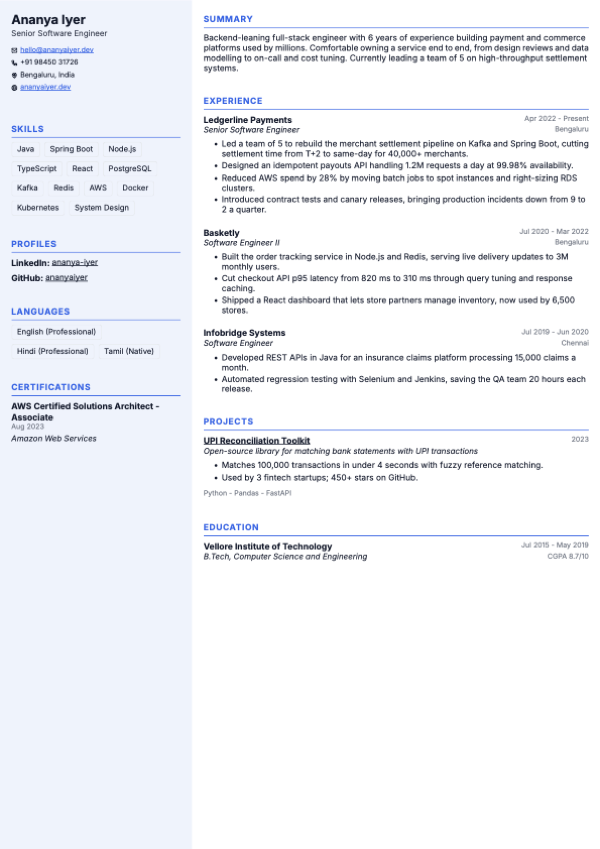
Does ATS read columns? In our extraction, it depends on which side the sidebar is. For each template the study records the first item pdf.js returned and the section headings in the order it returned them. This is the study output for Slate, and for Aurora (single column) beside it:
"slate": {
  "firstLine": "Ananya Iyer",
  "readingOrder": ["SKILLS", "PROFILES", "LANGUAGES", "CERTIFICATIONS",
                   "SUMMARY", "EXPERIENCE", "PROJECTS", "EDUCATION"]
}
"aurora": {
  "firstLine": "Ananya Iyer",
  "readingOrder": ["SUMMARY", "EXPERIENCE", "PROJECTS", "EDUCATION",
                   "SKILLS", "PROFILES", "LANGUAGES", "CERTIFICATIONS"]
}
The whole left sidebar comes first, then the main column. Harbor, which has the same structure, has the identical order. Vertex, with its sidebar on the right, came out like the single-column template: summary, experience, projects and education first, then skills, profiles, languages and certifications.
So the side of the sidebar changed what a parser meets first. All three templates passed our name-first check either way.
Why does it matter? A parser that files text by guessing which heading it sits under now has four sidebar sections before anything that looks like a job. A parser that sorts by position does something else again: it reads across the page row by row and can interleave a sentence from your summary with a line of your skills. I cannot tell you which one an employer runs, and neither can you. That uncertainty is the cost of two columns.
Letter spacing: when EXPERIENCE becomes E X P E R I E N C E
Designers like wide-tracked capitals. Text extractors do not. We rendered the same heading (EXPERIENCE, in the Aurora template) with different amounts of per-letter tracking:
| Heading tracking (pt) | What pdf.js extracted |
|---|---|
| 0 | EXPERIENCE |
| 0.5 | EXPERIENCE |
| 0.6 | EXPERIENCE |
| 0.75 | EXPERIENCE |
| 1 | E X P E R I E N C E |
The split sits somewhere between 0.75pt and 1pt. We did not pin it down further. A heading that extracts as single letters is not a heading to a parser, so “Experience” can fail to be recognised as a section.
This one was our own bug. Before we fixed it, our uppercase headings added 1pt of tracking by default, which is the value that splits in this probe. We cut it to 0.6pt. The builder’s checks also now warn when letter spacing is set high. If you use any design tool, the lesson carries over: wide-spaced capitals look neat and extract badly.
The rotated name
One retired template, Beacon, set the candidate’s name vertically on a left rail. It is the only template of the 21 where the name-first check failed. The first item pdf.js returned was the name, but split into spaced letters, so the check, which matches the exact name, failed:
"beacon": { "firstLine": "A N A N Y A" }A search for the name would not match it either. The name is the one thing every parser has to get right, and a nice-looking rail broke it. Beacon is retired, and its successor is Keel.
Fonts and the space between words
Extractors often rebuild the spaces between words by looking at the gap compared with the text size. So a font with a narrow space glyph leaves less room for error. We measured the space width of the 12 fonts our builder offers, in em (one em is the font size):
| Font | Space width (em) |
|---|---|
| Lato | 0.193 |
| Source Sans 3 | 0.2 |
| EB Garamond | 0.2 |
| IBM Plex Sans | 0.236 |
| Merriweather | 0.237 |
| Source Serif 4 | 0.237 |
| Figtree | 0.247 |
| Roboto | 0.248 |
| Playfair Display | 0.249 |
| Open Sans | 0.26 |
| Lora | 0.263 |
| Inter | 0.281 |
Inter’s space is about 46% wider than Lato’s. We did not build a check for words running together, so treat this as a measurement and not a finding: it tells you where the thin margin is. It is the cheapest thing to check before you pick a font.
What we changed, and the three two-column templates we kept
What the study and the work around it changed:
- Heading tracking cut from 1pt to 0.6pt, so uppercase headings extract whole.
- Two warnings in the builder’s checks. One flags letter spacing set high. The other adds a note on a two-column template: “Some ATS read columns out of order. A single-column template parses most reliably.”
- Retirements. Beacon (the rotated name) is gone, with Keel as the successor. Marquee (a banner header) became Summit, Meridian (two columns) became Vertex, and Quill (a single-column serif) became Regent. The study showed no extraction problem for Marquee or Meridian. Quill was retired for design reasons, not because the study found a fault: it was a very airy, decorative serif that wasted space. Resumes already made in a retired template still open and render.
We kept Vertex, Slate and Harbor. People like sidebars, and a two-column PDF for a human reader is a legitimate thing to make. They are labelled “Two-column” and not marked ATS-safe, instead of being hidden or oversold (the label follows the layout, and our own pdf.js self-test is what backs the ATS-safe claim for the 14 single-column templates), the same stop-and-say-so habit as our OTP pause in auto-apply.
When a two-column resume is fine
My opinion: two columns for the PDF a person will read, one column for the file a portal reads first. For the resume you email to a referral, hand to a hiring manager or bring to a campus event, a two-column design is fine and may well read better. For the file that goes into Naukri, LinkedIn or a company career page, send the single-column one.
The two layouts side by side. Apart from the parse-order row, this is general guidance, not a measured result:
| One column | Two columns | |
|---|---|---|
| Page density | Lower. Everything stacks | Higher. A sidebar frees room in the main column |
| Human scan | Plain and quick | Often easier to skim, if the sidebar holds the right things |
| Parse order | One order, top to bottom | Depends on the parser. In our extraction, a left sidebar came out before the main column and a right sidebar came out after it |
| Best use | Portal uploads and company career pages | A PDF handed to a person |
Rule of thumb: if software reads it first, one column. If a person reads it first, your choice. Keep both versions of the file and name them so you do not mix them up.
People often reach for two columns to fit more on the page or to give skills a corner of their own. For the first, how long should a resume be covers what to cut instead. For the second, what to put in the skills section shows a grouped layout that stays in one column.
How the test works, if you want to repeat it
The method is simple enough to rebuild. We render each template to a PDF with the same sample resume, then read the PDF back with pdf.js, the way a text-extraction step would. For every render we record the position and text of each item pdf.js returns. From that we check for overlapping items on the same line, items inside the page margin, and whether the first item is the candidate’s name. For reading order we record the section headings in the order pdf.js returns them. The matrix is 21 templates by 20 renders, with the paper sizes, margins and content lengths listed above. The letter-spacing probe re-renders one heading at five tracking values. The font table is the width of the space glyph read from each font file.
The limits are the ones above: one made-up resume, our templates only, and pdf.js is not any vendor’s parser. Every number on this page comes from one run on 12 October 2026.
For your own file, the check takes two minutes. Copy all the text from your PDF into Notepad and read it top to bottom, then run the PDF through the free ATS resume checker. The can ATS read PDF post explains the whole test, and the ATS-friendly resume guide for India covers the words inside. If you are comparing builders first, free resume builders compared lays out what each one charges for the download. If you would rather start from a layout that already passes, the template gallery shows all 17, and you can open the ApplyCove resume builder free.